Your quickest SEO wins usually sit in queries where you already rank between positions 5 and 20. Those are low hanging fruit keywords, also called striking distance keywords: Google already considers your page relevant, but it sits just low enough that few people click. To find them, open the Search Console Performance report, filter the Queries table to positions 5 through 20, sort by impressions, and match each query to the page that ranks for it. Then apply the fix that fits the position band.
That last part is where most advice falls apart. A page at position 7 and a page at position 16 need completely different work, and rewriting titles on a page that really needs better content is one of the most common wasted efforts I see in audits.
What Makes a Keyword Low Hanging Fruit?
A keyword is low hanging fruit when three things are true: you already rank for it, you rank close to the top without being there, and the query gets enough impressions to matter. The ranking is the part you can’t fake. It’s proof Google has tested your page for that search and found it at least partly useful, which is more than any keyword tool can promise about a term you’ve never targeted. That’s the whole appeal.
Why does position 5 to 20 deserve special attention? Because clicks collapse as you slide down the page. Backlinko’s analysis of 4 million Google results found the #1 organic result gets an average CTR of 27.6%, the top 3 results take 54.4% of all clicks, and only 0.63% of searchers click anything on page two. Moving from 14 to 6 can matter more than publishing three new posts.
There are other benefits beyond raw clicks. The work is cheap, because you’re editing a page that exists instead of commissioning a new one. The risk is low, because a page that already ranks rarely collapses from a better title or an added section. And the feedback is fast, so you learn what moves rankings on your particular site within weeks, not quarters. For a small business with a tight budget, that combination is hard to beat.
People search for “striking distance keywords” and “low hanging keywords” as if they’re different ideas. In practice they’re the same bucket. I use “striking distance” for the position range and “low hanging fruit” for the subset that’s also worth the effort.
Which Signals Decide the Fix?
Every query in your list gets sorted by four variables:
- Position band. Positions 5 to 10 are on page one but below the fold for many searches. Positions 11 to 20 are page two, which is close to invisible.
- Impressions. Under about 100 impressions in 3 months, I rarely bother. The upside is too small to justify the edit.
- CTR against your own baseline. Compare a query’s CTR with other queries on your site at a similar position, not with an industry average.
- Intent match. Does the ranking page actually answer what the searcher typed? If not, no amount of tweaking will hold the gain.
How to Find Low Hanging Fruit Keywords in GSC, Step by Step
Here’s how to find low hanging keywords in GSC with the Performance report. The screenshots come from our original walkthrough; a couple of menu names have been updated since, and I note them below.
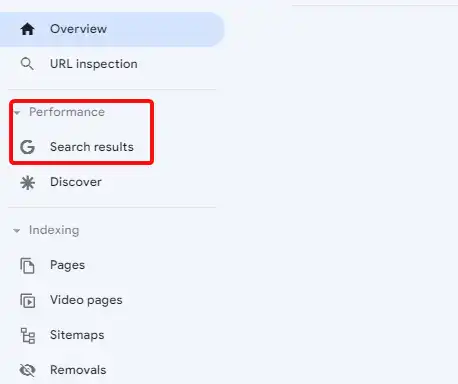
- Open Search Console, choose your property and click Performance, then Search results.
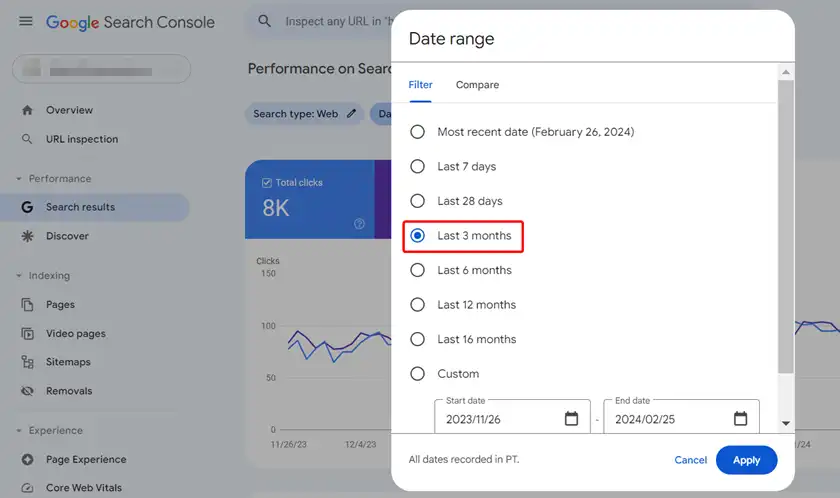
- Click the date filter and set Last 3 months. That’s also the default, and it’s long enough to smooth daily swings.
- Open the Queries tab below the chart.
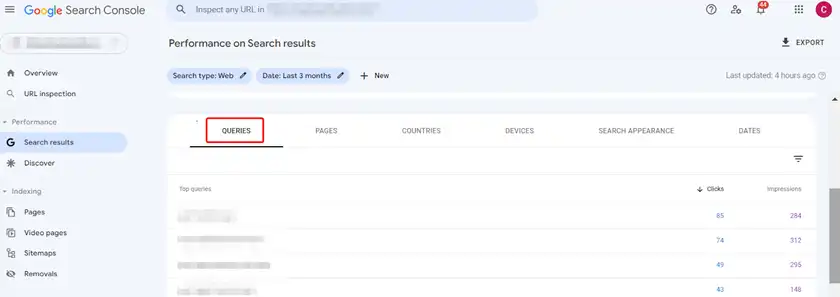
- Turn on all four metric cards: Total clicks, Total impressions, Average CTR and Average position. The table only shows CTR and position columns when those cards are active.
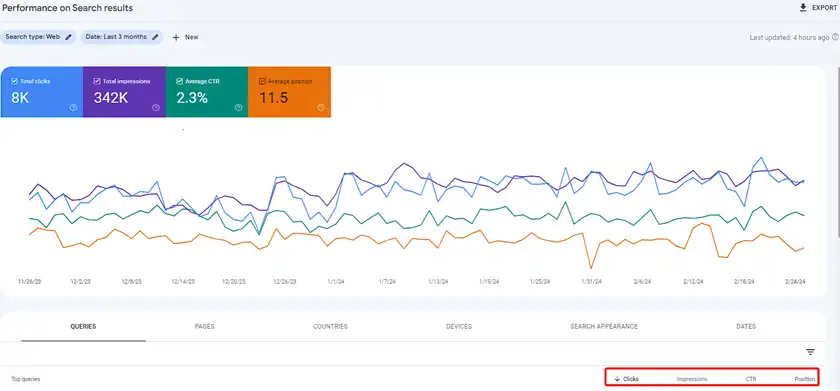
- Click the filter icon above the table and add two row filters: Position greater than 4, and Position smaller than 21.
- Sort by Impressions, highest first.
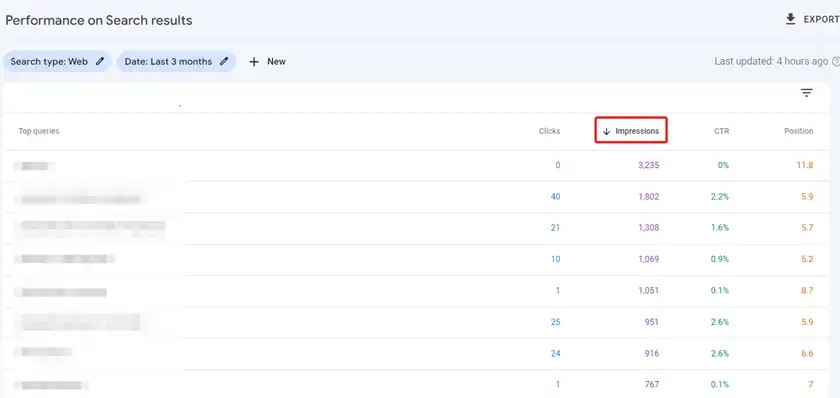
- Click a promising query, then open the Pages tab to see which URL ranks for it. Note the query, page, position, impressions and CTR in a sheet.
Here’s the real example from our original walkthrough. The query “old keyboard connector” had 1,051 impressions and a CTR of just 0.1%.

A short-tail query like that is vague on its own, so we ran it through Google suggestions and Ahrefs to see what people really meant. The long-tail variations told the story: “how to convert an old keyboard connector to USB” and “how to connect an old keyboard connector to USB.” Searchers wanted a fix. Any page hoping to win that query has to lead with the fix, not with the history of PS/2 ports.
Keep your notes simple. I use one sheet with six columns: query, ranking URL, position, impressions, CTR and the branch it belongs to. After 20 or 30 rows, patterns jump out. You’ll often see the same page appear five or six times, which tells you one update could lift a whole cluster of queries at once. Those pages go to the top of the list.
Branch A: Positions 5 to 10 With Weak Clicks
If the query ranks on page one but CTR is well below your baseline for that position, the problem is usually the search snippet, not the content. Google is already showing you. People just aren’t choosing you, though I first rule out an AI Overview or other SERP feature sitting above you, using the steps in my guide to high impressions and low clicks.
My checklist for this branch is short. Rewrite the title so it uses the searcher’s own wording near the front. Make the meta description promise the specific outcome. Check whether a rival result has a date, a price or a number in its title that yours lacks.
Here’s what that looks like on a real query from above. A title like “Old Keyboard Connectors: A Brief History” ranks, but it answers a question nobody asked. “How to Connect an Old Keyboard to USB (PS/2 Adapter Guide)” speaks to the person searching. Same page, same topic, completely different reason to click.
Keep the title under roughly 60 characters so it doesn’t get cut. And remember Google may rewrite it anyway if it doesn’t match the page, so the heading on the page should tell the same story.
One caution. AI Overviews now eat into clicks for many informational queries. A Pew Research Center study of 68,879 searches found users clicked a traditional result in 8% of visits when an AI summary appeared, against 15% without one. So before you blame your title, search the query yourself and see what sits above you.
Branch B: Positions 11 to 20 on Page Two
If the query sits on page two, the snippet barely matters because almost nobody sees it. Forget the title. This branch needs a content and signals fix, and it takes longer, because Google has to recrawl the page, reassess it against the pages above you and decide your version now deserves a place on page one.
Start with intent. Read the top 5 results and write down what they cover that you don’t. Then add a clearly labeled section that answers the query directly, ideally with the query phrased as a heading. Update any stale numbers or screenshots while you’re in there.
Next, internal links. Find 2 or 3 of your pages that already earn traffic on related topics and link to the target page with descriptive anchor text. In my experience, this is the most underused fix in the whole process, and it costs nothing.
If both are done and the page still stalls after a few weeks, the gap is probably authority. That’s a longer project than “low hanging” implies, so move the keyword to your main SEO plan rather than forcing it.
What If Two of Your Pages Compete for the Same Query?
Sometimes the Pages tab shows two or three of your URLs for one query, each stuck around position 12. That’s not a content problem. Google can’t decide which page you want to rank.
Pick the stronger URL, usually the one with more clicks and backlinks over the last 3 months. Merge the useful parts of the weaker page into it, then redirect or re-link as appropriate. Don’t add a third page. Ever. I’d also hold off on any other changes to those URLs until rankings settle, or you won’t know what worked.
Is the Keyword Actually Winnable?
Not every striking distance keyword is low hanging. Before I commit time, I do a two-minute sanity check. I search the query in a private window and look at who ranks: if the top 5 are all household-name brands or government sites, a small site may never crack them. I also glance at a keyword difficulty score in whichever tool I have open, though I trust the live results more than any single number.
Seasonality is the other trap. A query that looks weak in September might peak every December. Use Compare in the date filter to check the same months last year before you rewrite anything.
Why the Numbers Can Mislead You
- Average position hides device splits. A query ranking 3 on mobile and 25 on desktop can average out to page two. Filter by device before deciding on a branch.
- Brand queries flatter CTR. Exclude them with the branded queries filter if your property has it, so your baseline isn’t inflated.
- Anonymized queries vanish when filtering. Your filtered table will never add up to the chart total, and that’s expected.
- Very new pages bounce around. Wait until a page has at least a month of data before treating its position as stable.
The Fix-by-Position Matrix
| If the position is… | And the signal is… | Then do this |
|---|---|---|
| 5 to 10 | CTR below your baseline | Rewrite title and meta description |
| 5 to 10 | CTR normal | Add depth or FAQs to push toward top 3 |
| 11 to 20 | Intent partly covered | Add a dedicated section and internal links |
| 11 to 20 | Two URLs trading places | Consolidate into one page |
| Any | Under 100 impressions in 3 months | Skip it for now |
How Long Before You See Results?
After updating a page, I use the URL Inspection tool to request indexing and add a custom annotation on the date. Then I leave it alone. Changing a page every week makes it impossible to read the data, since you can never tell which of the five edits moved the needle or whether the movement was just Google’s normal weekly wobble.
In my experience, a snippet fix shows up in CTR within 2 to 4 weeks, while content and internal link changes for page-two keywords take longer, often 6 to 8 weeks. Compare the 4 weeks after the change with the 4 weeks before, same query, same device.
If you’re still hunting for new topics rather than fixing existing pages, that’s a different job. My guide to Google Search Console keyword research covers the discovery side.
Signs You Need More Than Quick Wins
Low hanging fruit keywords work best on a site that’s broadly healthy. If most of your queries sit past position 20, or traffic is sliding sitewide, tweaking pages one at a time won’t fix it. That points to technical, content or authority problems across the whole domain. For that, our complete SEO service starts with a full audit, or you can request a free SEO audit first and decide from there, or work through my full SEO audit checklist yourself.
Frequently Asked Questions
What Are Low Hanging Keywords?
They’re queries your site already ranks for, usually between positions 5 and 20, where a modest improvement to the page could move you into the top results. The term describes effort versus reward: the ranking already exists, so the work is optimization, not creation.
What Counts as a Low CTR in Search Console?
There’s no universal number. Compare each query with other queries on your site at a similar average position, with branded queries removed. If similar positions average 4% and one query sits at 0.5%, that gap is worth investigating.
Should I Write a New Page for a Striking Distance Keyword?
Usually not. The existing page already has Google’s trust for that query. Improving it is faster and safer than starting a new URL, which can end up competing with the original.
How Many Keywords Should I Work On at Once?
I’d pick 10 to 20 pages per round, not 200. Fewer changes make it much easier to see which fixes worked, and you can repeat the process every month or quarter.
Last updated: September 2026 by Mizanur Rahman