Product page SEO is the work of making each product URL easy for Google to understand and worth clicking in the results: a specific title, copy nobody else has, real photos, visible reviews and product structured data that matches the page. That’s the short answer. The longer answer depends on what you sell, because a shop with 40 handmade products and a reseller with 8,000 SKUs copied from the manufacturer need very different plans.
I’ve been doing SEO since 2018, and product pages are where I see the most wasted effort. When I audit an online store, the first thing I check is whether the product copy exists anywhere else on the web. It usually does. So below you’ll find the main path most stores should follow, then the two branches where the advice changes.
What Decides Your Product Page SEO Plan?
Four things change what I’d tell you to do first:
- How unique your products are. If you make them, you own the description and the photos. If you resell a brand, fifty other stores probably publish the same text.
- How many SKUs you manage. Under a few hundred, you can hand-edit every page. Past a few thousand, you fix templates, not pages.
- Whether products come in variants. Color and size options raise the “one URL or many?” question, and Google has specific markup for it.
- Which platform you run. Shopify, for example, creates extra product URLs through collections. I cover that in my guide to Shopify product pages.
Keep your answers in mind. The decision matrix near the end pulls them together.
The Main Path: A Store Selling Its Own Products
This is the most common case I see: a store with its own products, a few dozen to a few hundred SKUs, and no product page optimization done beyond whatever the theme set up. Work through these steps in order. They’re the product page SEO best practices I use on every store, whatever the platform.
Match One Search Query to Each Product
SEO for product pages starts with one main query each page deserves to rank for. Honestly, the old rule of “only target keywords with 1,000+ monthly searches” hurts stores more than it helps. Most product searches are specific and low-volume, and that’s exactly why they convert.
Take a blue dress. “Blue dress” is broad and brutal. “Royal blue dress” is narrower, “navy blue cocktail dress” is narrower still, and “light blue lace summer dress” is someone who already knows what they want. Put the most specific accurate phrase on the product page. Leave the broad term to your category page.
Write a Title Tag That Names the Product
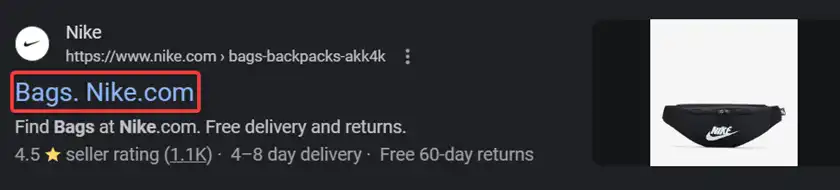
The title tag becomes the clickable headline in Google, so it has to say exactly what the product is. My default formula is product name, one deciding attribute, then brand: “Navy Blue Lace Cocktail Dress | Jones Fashion.” I aim for roughly 50 to 60 characters, since Google cuts long titles by pixel width and the end often disappears on mobile.
Put the words a shopper would type at the front. Brand goes last unless your brand is the thing people search for.
Treat the Meta Description as Ad Copy

Google’s own snippet documentation says there’s no limit on meta description length, but the snippet gets truncated to fit the device, and Google often writes its own from page content. So I don’t obsess over it. I write roughly 140 to 160 characters that answer “why this one?” with a benefit, a proof point and a shipping or returns detail.
An example I’d approve: “A navy lace cocktail dress with an A-line cut that flatters every size. Free shipping and 30-day returns.” Short, specific, no keyword spam.
Write Copy Only Your Store Has
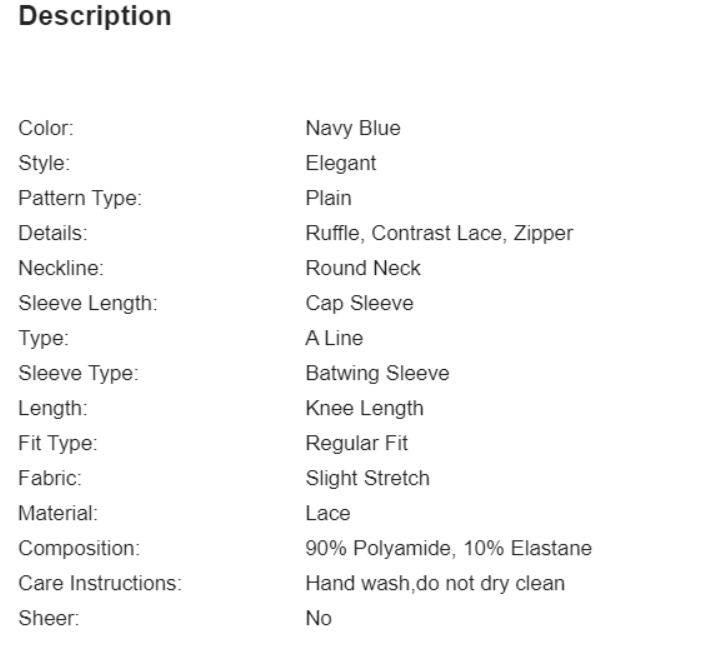
This step decides whether Google sees your page as worth indexing. Copying the manufacturer’s text gives Google no reason to rank you over the brand itself or the other stores using the same words. Your version should cover what the manufacturer never does: fit, feel, who it suits, what it pairs with, what people ask your support team. My full method, including a plan for catalogs with thousands of products, is in my product description guide.
Use one H1 (the product name) and as many H2s and H3s as the content genuinely needs. The old advice to cap product pages at two or three H2s never had a real basis. Structure follows content.
Use Real Photos, Clear File Names and Honest Alt Text
Name files for what they show, like “navy-blue-lace-cocktail-dress-front.jpg”, and write alt text that describes the image for someone who can’t see it. Don’t stuff keywords in either place. Serve images in WebP or AVIF, and size them for the space they fill.
Show the product in scale and on a person where it matters. Baymard Institute’s 2026 product page benchmark found 37% of leading ecommerce sites don’t provide in-scale images, which is an easy gap for a small store to close.
Show Reviews Where Buyers Can See Them
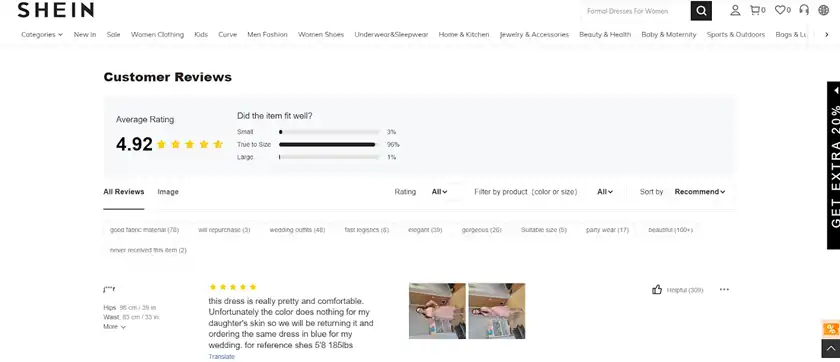
Reviews are the fastest trust fix I know. Northwestern’s Spiegel Research Center found the purchase likelihood for a product with five reviews is 270% higher than for one with none. The same research found purchase likelihood tends to peak at ratings between 4.0 and 4.7, not at a perfect 5.0.
So ask every buyer by email after delivery. Don’t filter who gets asked based on whether they seemed happy (that’s review gating), and never buy reviews. Reply to the bad ones in public. Shoppers read those replies.
Add Product Structured Data That Matches the Page
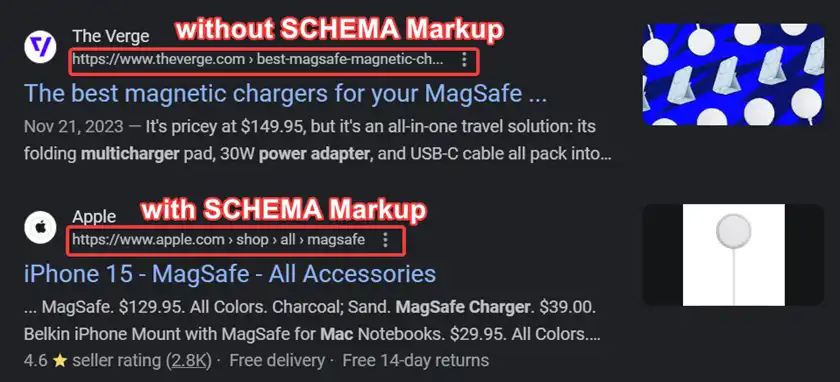
Structured data tells Google the price, stock and rating in a format it doesn’t have to guess. For a page where people can buy, Google’s merchant listing requirements are a product name, an image and an offer with a price above zero and a currency. Add shipping details, return policy, GTIN and ratings where you have them. I’d also connect a Merchant Center feed, since Google says using both maximizes eligibility.
Use JSON-LD, and make every value match what the visitor sees. One warning: skip FAQ markup on product pages. Google stopped showing FAQ rich results in Search on May 7, 2026, so the markup won’t earn you anything extra, though the questions themselves still work as normal on-page copy.
Link Products to Each Other and to Their Category
Internal links tell Google which pages matter. Link from each product to its category (and give that category page real work to do; see category page SEO), to two or three close alternatives and to items people buy with it. A navy dress page might link to “all cocktail dresses”, a matching clutch and a lighter blue version.
Vary the anchor text: product names, category names, plain phrases. Keep URLs short, lowercase and hyphenated (more in my URL structure guide), and if a URL ever changes, 301-redirect the old one to the new one.
Why Does Page Experience Weigh So Heavily on Product Pages?

Because the product page is where the sale happens, and most stores still get it wrong. Baymard Institute’s product page benchmark, updated in March 2026, rates 52% of desktop sites and 62% of mobile sites as “mediocre or worse” on product page UX. That’s a lot of lost carts.
For speed, measure Core Web Vitals in Search Console rather than chasing a PageSpeed score, since my page speed vs Core Web Vitals breakdown shows Google ranks on the real-user data. The “good” thresholds are LCP within 2.5 seconds, INP within 200 milliseconds and CLS at or below 0.1. The usual fixes are dull but they work: compress images, lazy-load below-the-fold images only (never the main product photo), and remove review or chat widgets that block the main thread.
Branch 1: When You Sell the Same Products as Everyone Else
If you resell branded products, you’re competing with the brand’s own site, Amazon and every other stockist using the same description. You probably won’t outrank the brand for the bare product name. I tell clients to stop trying and aim at the modifiers instead: sizes, compatibility, use cases, comparisons.
Here’s the order I’d work in:
- Pull product URLs from Search Console and sort by impressions. Rewrite the top 10–20% first.
- Replace the manufacturer paragraph with your own copy, then keep the spec table below it.
- Add your own photos. Even phone photos on a clean background beat the stock image everyone has.
- Answer the three questions your support inbox gets most about that product.
In my experience, this branch rewards patience more than volume. A few hundred genuinely rewritten pages do more than 5,000 lightly spun ones, and spun text can trip Google’s scaled content abuse policy.
Branch 2: When You Manage Thousands of SKUs
Hand-editing stops making sense somewhere past a thousand products. Here, ecommerce product page SEO becomes a template job. Fix the title formula once in the template, generate structured data from the product database, and make sure every product links back to a category and forward to related items automatically.
Then pick your hand-edited pages by revenue and search impressions, not by gut feel. Duplicate URLs from filters and sorting deserve their own audit, so I won’t cover faceted navigation here beyond one rule: filter pages shouldn’t compete with product pages for the same query.
What Changes With Variants, Discontinued Items and Marketplaces?
- Variants: If color or size is just an option, keep one URL and let shoppers pick. If a variant has its own real search demand, it can earn its own URL. Either way, Google’s product variant markup (ProductGroup) tells it which pages belong together.
- Discontinued products: If there’s a close replacement, 301 to it. If not, let the page return a 404 or 410 rather than redirecting everything to the homepage, a move Google’s own 404 help page calls problematic, as I cover in what a soft 404 means and how to fix it.
- Also selling on Amazon: Your own page needs something the listing doesn’t have: better photos, longer answers, bundles or a warranty.
Product Page SEO Decision Matrix
| If your catalog is… | And your product copy is… | Then start with… |
|---|---|---|
| Under 300 SKUs, own products | Thin or missing | Hand-write copy, titles and alt text for every page |
| Under 300 SKUs, resold brands | Copied from the manufacturer | Rewrite the top 20% by impressions, add own photos |
| 1,000+ SKUs, any source | Mixed | Fix templates first, then hand-edit top revenue pages |
| Any size, variant-heavy | Any | Decide one URL vs many, then add ProductGroup markup |
| Any size, on Shopify | Any | Fix collection-path links and theme schema first |
When Should You Bring in a Specialist?
Get technical help if your product pages render content through JavaScript that Google can’t see, if you’re migrating platforms, or if Search Console shows thousands of product URLs as “Crawled, currently not indexed.” Those are developer and technical SEO problems, not copywriting problems. If you’d like a second pair of eyes, our ecommerce SEO team starts with a free audit, and I’ll tell you honestly whether you need us or just a weekend with a checklist.
Frequently Asked Questions
Are Product Page Optimization and PDP Optimisation the Same Thing?
Yes. PDP stands for product detail page, so “product detail page optimisation” and product page optimization describe the same work. Some teams use PDP optimization to mean conversion work only, like button placement and trust badges. I treat SEO and conversion as one job, since a page that ranks but doesn’t sell is only half done.
Does Every Product Page Need Its Own Keyword?
Every indexable product page should have one main query it’s the best answer for on your site. Two products fighting for the same phrase split your signals. If two products really are near-identical, consider merging them into one page with variants instead of forcing separate keywords onto each.
Will Google Show Star Ratings for My Products?
It can, if your page has valid review or aggregateRating markup and the reviews come from real customers visible on the page. Google decides whether to show rich results, so valid markup makes you eligible without guaranteeing anything. Check the Rich Results Test and the Merchant listings report in Search Console after you publish.
Can I Keep the Manufacturer’s Description at All?
You can keep the technical specs, because nobody expects you to reinvent a battery capacity. What you shouldn’t do is let the manufacturer’s paragraph be the only text on the page. Add your own intro, fit or usage notes and answers to real customer questions above the spec table.
Last updated: September 2026 by Mizanur Rahman