A local SEO checklist is a fixed list of checks that tells you why a business does or does not show up in Google Maps and local results. Mine runs in six steps: profile ownership, Business Profile fields, name-address-phone consistency, website pages, reviews, then links and tracking. The order matters. A perfect service page cannot help a profile with the wrong primary category, so I always audit the profile before touching the site. Starting from zero instead? Follow my step-by-step guide on how to do local SEO first, and if your profile doesn’t appear at all, work through Google Business Profile not showing up.
Google says local results are mainly based on relevance, distance and prominence, and its ranking help page now calls that last one “popularity” in the summary line. Every check below maps to one of those three. Distance is the one you cannot change, so the checklist ignores it and works on the other two. Control what you can. Gyms feel distance more than most, which is why my gym and fitness studio SEO guide focuses on winning the catchment you already have.
What Changes Your Local SEO Audit Checklist?
Before I open anything, I answer four questions. Each one changes which checks matter most:
- Storefront or service-area business? A shop that customers visit shows its address. A plumber who drives to customers hides it and sets service areas instead.
- One location or many? Multi-location brands need one profile and one landing page per real location, so the audit multiplies.
- New or established profile? A new profile needs setup. An old one usually needs cleanup of duplicates and stale data.
- Suspended or edited by someone else? If the profile is suspended, stop here. Reinstatement comes before any optimization.
How to Do a Local SEO Audit, Step by Step
This is the main path for a single-location business that already has a verified profile. It takes me about two to three hours for one location when I do it properly, less once you know where everything lives.
Step 1: Confirm Who Owns the Business Profile
Open the profile and check the list of people with access. The business owner must be the primary owner. An agency, a former employee or a web designer should be a manager at most. That’s also the first of my questions for how to choose a local SEO company.
It’s a common story in audits: a web designer or an old agency created the profile years ago under their own Gmail account, then stopped answering emails, and now the owner cannot change a phone number on their own listing without begging a stranger for access. Check this first. It takes two minutes.
If you cannot get access, request ownership through Google before doing anything else. If an old agency is the owner, get it transferred now, while you are still on speaking terms.
Step 2: Audit the Business Profile Fields
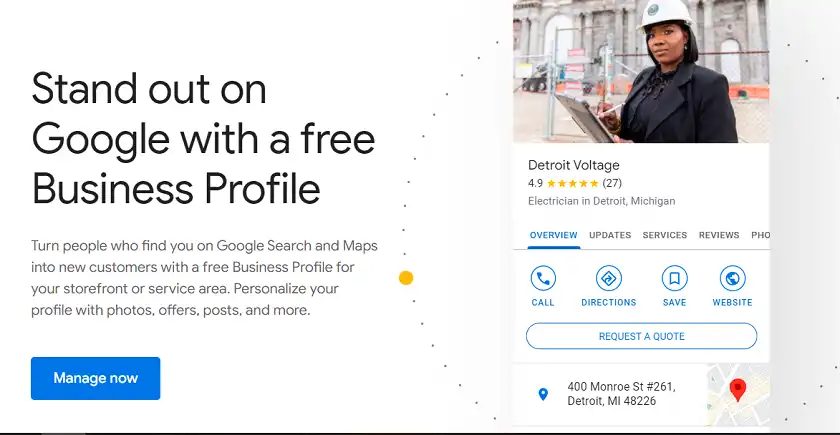
Google renamed Google My Business to Google Business Profile years ago, but the fields that matter have not changed much. Start with the primary category (here’s how to choose Google Business Profile categories), because the 2026 Whitespark Local Search Ranking Factors survey of 47 experts ranked it the top map pack factor out of 187. Then check secondary categories, hours, services, description and photos.
Watch the business name closely. Google’s guidelines say names must reflect the real-world name, and extra keywords “could result in the suspension” of the profile. I still see “Best Plumber Dallas Cheap” style names in audits, and I remove them every time, even though keyword-stuffed names can rank for a while.
One stale item to clear out: Google retired the public questions-and-answers section on Business Profiles in late 2025. If old guides tell you to seed Q&A, skip it. Put those answers in your description, services and website instead.
Step 3: Check NAP Consistency and Citations
NAP means name, address and phone number. Search your business name plus your phone number and look at what Yelp, Facebook, Bing Places, Apple Business (formerly Apple Business Connect) and your industry directories show. My guide to local citations covers which listings are worth the effort. Every mismatch goes on a spreadsheet. Tedious? Yes. Worth it.
People often ask me about “Localeze vs Moz Local,” so here is the short answer. Neustar Localeze is a data aggregator, a wholesaler that feeds business listings to other sites. Moz Local is a paid listing-management tool that pushes your details out to directories for you. They are different layers, which is why they come up together, and for a single location I’d fix the top 10–15 listings by hand before paying for either.
Step 4: Audit the Website Pages

Whitespark’s experts ranked “dedicated page for each service” as the number one local organic factor. So my first question on the website is simple. Does every main service have its own page, with the city in the title tag and real detail on the page?
When I find a site that crams drain cleaning, water heaters, leak repair and bathroom remodels onto one “Services” page with four short paragraphs, I already know why the business ranks for its own name and almost nothing else. Split them. One service, one page.
Next I check the page the profile links to. It should be the homepage or the matching location page, carry the same NAP as the profile, and include LocalBusiness structured data (or a more specific subtype) that matches the visible content.

Then mobile. Google retired its Mobile-Friendly Test in December 2023, so use Lighthouse in Chrome DevTools or PageSpeed Insights on the mobile setting. Check Core Web Vitals: LCP under 2.5 seconds, INP under 200 milliseconds, CLS under 0.1. Old checklists that tell you to build AMP pages or chase FID are out of date. INP replaced FID in March 2024.
Step 5: Audit Reviews and Review Velocity

Count three things: total reviews, reviews in the last 90 days, and the share with an owner reply (my templates for responding to Google reviews make that part quick). Recency matters to buyers. In BrightLocal’s 2026 consumer survey, 74% of people said they want reviews from the last three months, and 47% won’t use a business with fewer than 20 reviews.
Then check how the business asks. Google’s review policy bans incentives such as discounts for reviews, and it bans selectively asking only happy customers. Honestly, this is the item I find broken most often. Ask every customer, the same way, every time.
Step 6: Check Links, Mentions and Tracking
Look for local links: chamber of commerce, local sponsors, suppliers, local news. You don’t need hundreds. In my experience, a handful of real local links from the chamber, a youth football sponsorship or a supplier’s dealer page usually beats any cheap directory blast, no matter how many links it promises.
Finally, tracking. Add UTM tags to the profile’s website link so Google Analytics separates profile traffic, confirm Search Console is verified, and write down calls, direction requests and website clicks from the profile’s performance screen. Without a baseline, you cannot prove any fix worked.
Local SEO Audit Checklist: Service-Area Businesses
If customers never visit your address, hide it on the profile. Google’s guidelines say service-area businesses should not show their address, and that your overall service area should not extend farther than about two hours of driving time. Pick the cities you actually serve and profitably reach.
For the website, build one strong page per core service first. City pages come second, and only when you have something unique to say about each city, such as real jobs, local prices or permit rules. Twenty copy-paste city pages are a doorway problem, not a strategy.
Local SEO Audit Checklist: Multi-Location Businesses
For chains and franchises, the audit repeats per location, but the patterns matter more than any single profile. I look for three things: duplicate profiles for the same address, categories that differ between locations for no reason, and location pages that are 95% identical.
Each real location needs its own verified profile, its own landing page with local details, and the matching NAP on both. When one location underperforms, compare its categories and review count with your best location before you blame the algorithm.
The Printable Local SEO Checklist
Here is the whole local search engine optimization checklist in one place, in audit order:
- Owner access confirmed; agencies set as managers only.
- Primary category is the most specific correct option; secondary categories are real.
- Business name matches signage, with no added keywords or cities.
- Hours, services, description and photos complete and current.
- Address shown for storefronts, hidden for service-area businesses.
- NAP identical across the top 10–15 directories and the website.
- One dedicated page per core service, city in the title tag.
- LocalBusiness structured data matches visible page content.
- Mobile pass: LCP ≤ 2.5s, INP ≤ 200ms, CLS ≤ 0.1.
- Reviews: steady monthly flow, owner replies, no incentives, no gating.
- A few genuine local links and mentions.
- UTM-tagged profile link and a baseline of calls, clicks and direction requests.
Decision Matrix: What to Fix First
| If the audit finds | And | Then |
|---|---|---|
| Suspended profile | Any stage | Reinstatement request first; stop all other work |
| Wrong primary category | Profile otherwise fine | Fix category today; recheck rankings in 2–4 weeks |
| Keywords in business name | Name differs from signage | Rename to the real name before a competitor reports it |
| Fewer than 20 reviews | Competitors have 100+ | Build a review ask into every job, no incentives |
| No service pages | Only a homepage | Build one page per core service before city pages |
| NAP mismatches | Old address or phone online | Fix top directories by hand, then consider a listing tool |
When Should You Bring In Help?
Call in a specialist when the profile is suspended, when duplicates keep coming back after you remove them, or when a location has been merged with another business. These problems need someone who has done reinstatements before. If you want that done for you, our local SEO service covers profile repair, citations, reviews and pages. For an example of the checklist applied to one industry, see my guide to SEO for auto repair shops.
Frequently Asked Questions
How Often Should I Run a Local SEO Audit?
I run a full local SEO checklist once a quarter for active clients and a quick profile check every month. Run one immediately after moving, rebranding, changing phone numbers, or seeing a sudden drop in calls from the profile.
Do I Need a Physical Address for Local SEO?
No. Service-area businesses can rank without showing an address. You still need a real business location for verification, and you must hide it if customers do not visit. Virtual offices and PO boxes are not allowed.
Is a Listing Tool Like Moz Local Worth Paying For?
For one location, usually not at first. Fix the major listings by hand. For five or more locations, a listing tool saves enough hours to pay for itself.
What Is the Biggest Mistake in a Local SEO Checklist?
Starting with the website. Most of the fast wins sit in the Business Profile: the primary category, the real business name, complete services and a steady flow of reviews.
Last updated: September 2026 by Mizanur Rahman